• Skip to primary navigation
  • Skip to main content
  • Skip to footer
Cyara

Cyara

Cyara Customer Experience Assurance Platform

  • Login
  • Contact Us
  • Request a demo
  • Search
  • Login
  • Contact us
  • Request a demo
  • Why Cyara
    • Cyara Agentic Platform
    • Cyara partner network
    • Cyara Academy
  • Products
    • ValidationBuild your CX stack with confidence – every layer, validated early
          • AI bot validationValidate conversational AI, GenAI, agentic AI chat, and voice bots
          • Telco infrastructureValidate carrier connectivity and routing for global calling and SMS
          • Network & endpointsValidate WebRTC media paths and agent desktop connectivity
    • ReadinessDeploy your CX journeys with confidence – at scale, through change
          • Agentic journey assuranceAssure end-to-end agentic and hybrid journeys before go-live
          • Load and performanceAssure CX journeys through load, peak, and scale
          • Human agent readinessAssure inbound and outbound agent paths before go-live
    • ObservabilityRun your CX operations with confidence – continuous monitoring, proactive resolution
          • Agentic AI trust & governanceMonitor AI agent hallucination, compliance, and misuse
          • Omnichannel observabilityMonitor end-to-end CX journey experience across channels
          • Human agent monitoringMonitor live agent connectivity and experience in real-time
    • Learn about the Cyara Agentic Platform
  • Resources
    • CX Assurance blog
    • Customer success showcase
    • CX use cases
    • Events & upcoming webinars
    • On-demand webinars
    • Resource library
  • About Us
        • About Cyara

        • About Cyara
        • Leadership
        • Careers
        • Legal statements, policies, & agreements
        • Services

        • Cyara Academy
        • Consulting services
        • Customer success services
        • Technical support
        • News

        • Press releases
        • Media coverage
        • Cyara awards
        • Partners

        • Partners

Blog / CX Assurance

March 24, 2021

Testing SMS Chatbots with Botium

Attila Ujj, Sr. Software Engineer

This article was originally published on Botium’s blog on March 24, 2021, prior to Cyara’s acquisition of Botium. Learn more about Cyara + Botium

Botium offers two methods to test an SMS chatbot. It can act as a user sending SMS messages or can interact with the API behind the chatbot. Sending SMS messages looks like an optimal choice because it covers all the stack, but it has a major drawback, the increased costs.

people testing chatbots

For smaller systems sending SMS messages is usually a good decision. It is an all-purpose solution, and it is easier to set up.

More complex chatbots can have more sophisticated configuration, API-testing all conversation branches, and SMS-based testing for checking performance and availability of the full stack for example.

Tip: If your API delivers NLP information like recognized intent and entity, then in case of API testing you can even use NLP Analytics in Botium (depending on license).

API Testing

There is no step-by-step solution for API testing. We need a Botium-connector which fits to your API. You can use the suitable generic connector of Botium Box (in most cases Generic HTTP(s)/JSON interface). Or you can write your own.

SMS testing with Botium Twilio SMS connector

Botium Box uses Twilio to communicate with any SMS chatbot. 

You’ll need a Twilio account, register a telephone number in Twilio, and configure Botium Box for Botium-to-Twilio messages, and Twilio for Twilio-to-Botium messages.

You can use a trial account for Twilio, but there are limitations, and the budget is limited. We use an upgraded account here.

Please keep in mind that SMS communication has no session. If you have for example development, and production tests, then it is a good practice to register telephone numbers and configure connection in Botium for each. Otherwise you can get some random test fails if they are running in parallel.

Twilio account

Follow the steps to start a trial and upgrade.

Register a telephone number

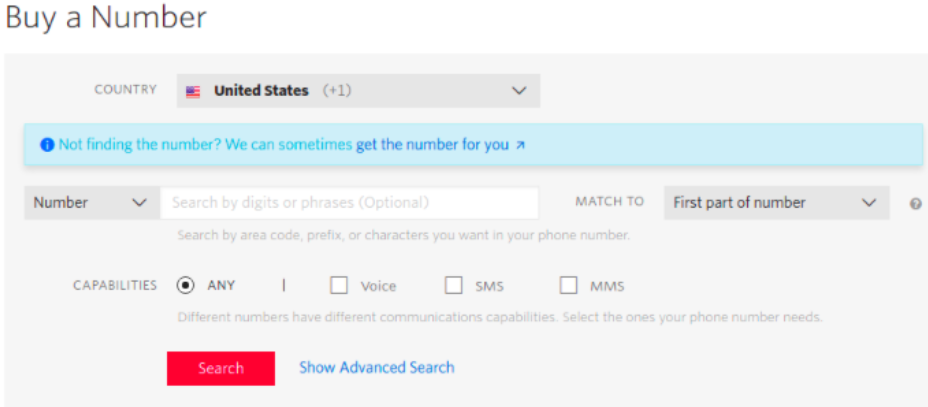
Navigate to Active Numbers, and click on Buy a Number. Consider choosing the same country as the one, where your chatbot’s number is located. And choose ANY or SMS in capabilities, and buy a number.
Check SMS capability (optional).
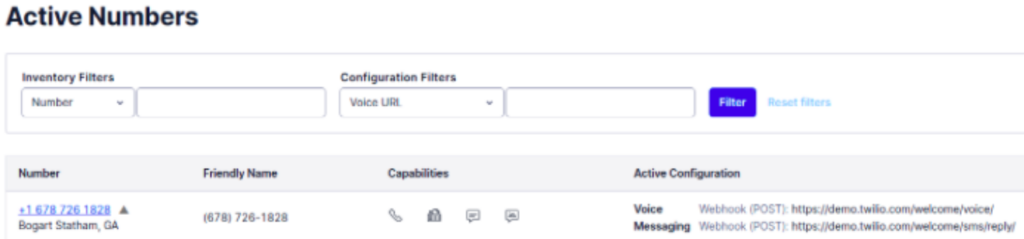
Notice the telephone number, and the credentials (settings, general)

Configure Twilio in Botium

Now we have to set up Botium.

Under the Chatbots list click on the Register new chatbot button.

register new chatbot

Fill the form with the values from the Twilio Dashboard. (Sending SMS to the field is the telephone number of your SMS chatbot.)
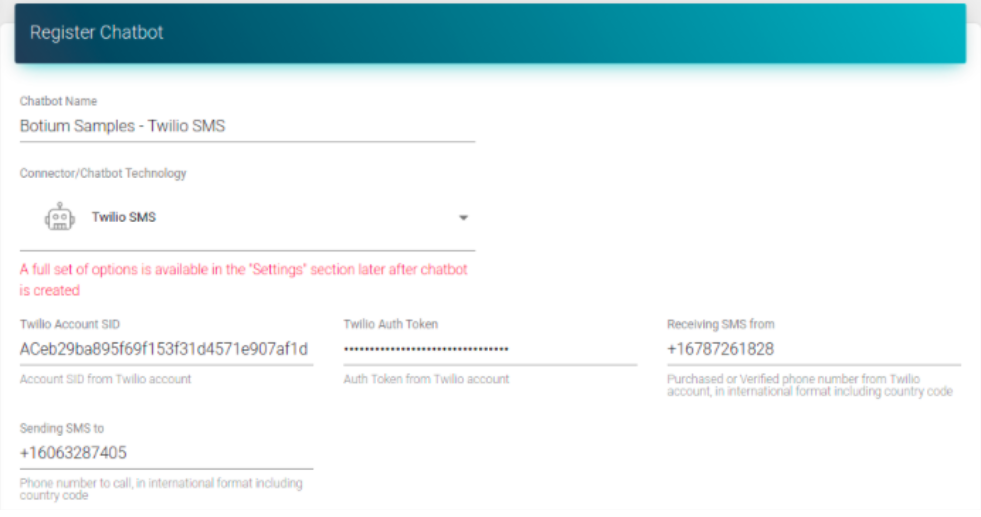
Once the form is complete, Botium Box will be able to receive messages. But we can’t test the connection yet. We have to configure Twilio to send messages to Botium Box.

After you choose an API key, you can see the endpoint for receiving messages on the registration form. Copy the endpoint URL.

Configure the Twilio webhook

Open the settings for the registered number in Twilio, and paste the endpoint as a webhook in the Messaging section (not in the Voice & Fax section!), and save it.
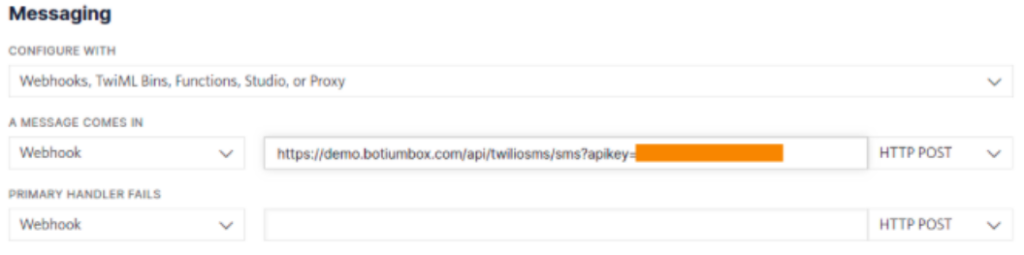
Test the connection and save it in Botium Box

Everything is set up. Now we can test it by pushing SAY HELLO (CHECK CONNECTIVITY) button. (We expect that the chatbot responds if we send hello. If it’s not the case, then skip the test. You can test it manually using the Live chat feature of Botium).
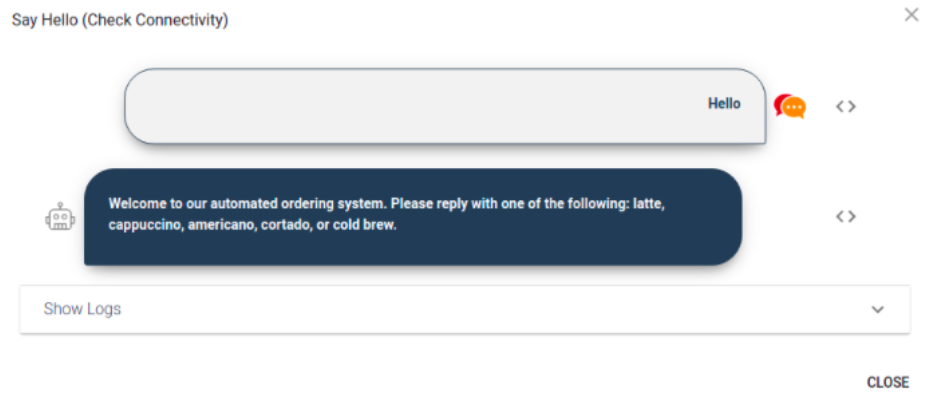
Everything is fine, we can save the form.

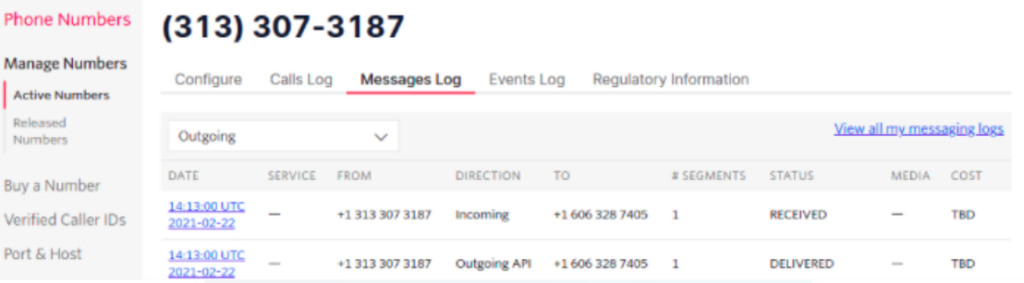
If it is not working, then check the error message displayed on the connectivity test, or check Twilio logs on the phone number.
Disable parallel execution in Botium

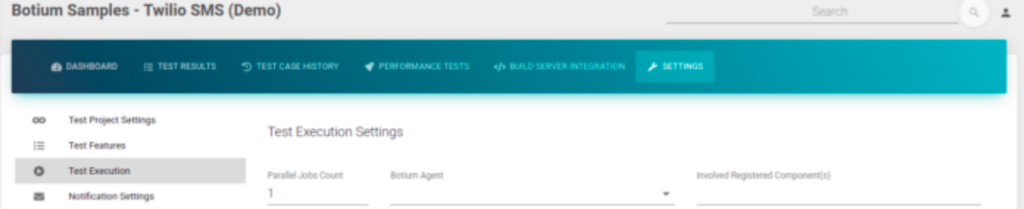
If you have more Agents (workers) in Botium, and more test cases in a test set, then Botium executes the test set parallel. It is good for most of the connectors, but not for Twilio SMS connector as mentioned before.

We have to set the Parallel Jobs Count to 1 (or choose a dedicated Agent) in project settings to disable parallel execution.
Use Botium Box

The connection is configured, and you can use all features of Botium!

See this article in Spanish here! 

Read more about: Chatbot testing, Chatbots, Cyara Botium, SMS chatbots, Test Automation

Related Posts

chatbot testing

June 25, 2026

Better Chatbot Testing, Better Performance: A Guide for CX Teams

Discover why modern chatbot testing platforms are essential for conversational AI testing, chatbot performance, and reliable CX.

Topics: AI chatbot testing, AI-Powered CX, Chatbot assurance, Chatbot testing

chatbot testing

June 11, 2026

Silent AI Failures in CX: When Bots Respond Correctly but Still Frustrate Users

Learn how to reduce risk, customer frustrations, and deliver better CX with AI and chatbot testing solutions.

Topics: AI chatbot testing, AI-Powered CX, Automated testing, Chatbot assurance, Chatbot testing, Customer experience (CX)

agentic AI

April 2, 2026

Deliver Agentic AI-Powered CX with Confidence: The Cyara Agentic Platform

As businesses leverage AI-powered CX, they need an agentic AI CX assurance platform. Discover the new Cyara Agentic Platform.

Topics: Agentic AI, Automated testing, Customer experience (CX), CX assurance platform, Digital transformation, Test Automation

Footer

Cyara
Leader Enterprise Best Est. ROI Enterprise Easiest To Use Enterprise
  • LinkedIn
  • YouTube
  • Products
    • Cyara Agentic Platform
    • Validation
      • Botium
      • Voice Assure
      • testRTC
    • Readiness
      • Velocity
      • Cruncher
      • testRTC
    • Observability
      • AI Trust
      • Pulse 360
      • Pulse
      • Number Trust
      • ResolveAX
  • Resources
    • CX Assurance Blog
    • Events & upcoming webinars
    • On-demand webinars
    • Customer success showcase
    • Resource library
  • Company
    • About us
    • Leadership
    • Careers
    • Press releases
    • Media coverage
    • Cyara awards
    • Partners
    • Legal
  • Support
    • Cyara Academy
    • Support sites

Copyright © 2006–2026 Cyara® Inc. The Cyara logo, names and marks associated with Cyara’s products and services are trademarks of Cyara. All rights reserved. Privacy Statement