
Traditional digital experience (DX) monitoring solutions focus on TCP-based web traffic, but call centers rely on UDP for voice calls. This mismatch means employees can have excellent web connectivity yet still experience poor voice quality. Effective call center monitoring requires specialized tools designed for real-time VoIP and Web real-time communication (WebRTC).
Over the past several years, the rise of remote work and digital interactions has completely transformed our world. From remote offices to virtual machines in cloud data centers, everything has become abstract, greatly impacting the ability to manage customer experiences and troubleshoot issues.
Cyara empowers businesses to test, monitor, and support WebRTC-based applications.

DX monitoring is the practice of measuring, analyzing, and tracking the quality of interactions employees have when accessing a company’s digital services.
While quite a few DX monitoring services promise an end-to-end solution to address these modern challenges, they are often entirely missing or falling short in a key service that all call centers need to maintain day-to-day operations: voice calls.
User Datagram Protocol (UDP) and Transmission Control Protocol (TCP)
The internet is built on top of two main transport protocols, User Datagram Protocol (UDP) and Transmission Control Protocol (TCP). Simply put, a transport protocol is what we use to pass data from one machine to another on the internet.
UDP can be seen and thought of as the spartan, “low level,” protocol. It does the bare minimum of sending data across the network, offering no guarantees of deliverability or even ordering. For example, if you send two pieces of data, you never really know if they were received, or if they were received in the correct order.
TCP, on the other hand, is the rich man’s solution. It creates a “connection” between two devices over the network, guaranteeing that whatever is being sent is received and is in the correct order. How? Through retransmission, when TCP detects that a packet was lost or corrupted, it automatically resends that packet until the receiver confirms delivery. It also has its own built-in congestion control mechanism to make sure the network doesn’t get overstrained. But whether that’s effective or not is another question.
This table offers an easy-to-understand comparison of UDP and TCP:
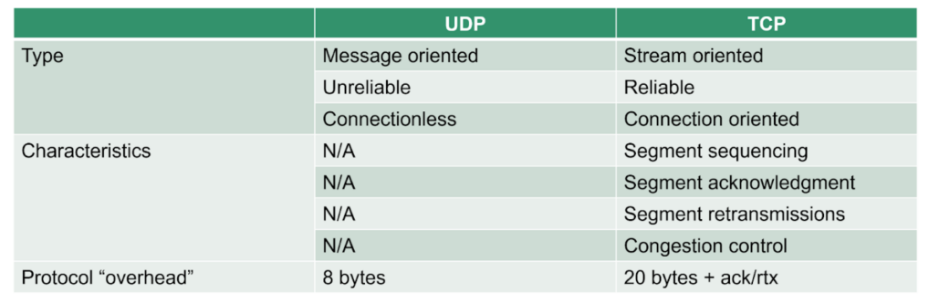
Key differences at a glance:
- UDP: No delivery guarantee, no packet ordering, lower latency, minimal overhead
- TCP: Guaranteed delivery, ordered packets, higher latency, built-in error correction
In simple terms, TCP is the web and voice calls are UDP.
Web and TCP
When it comes to the modern internet, TCP is used on a daily basis. For instance, HTTP and WebSocket, the two main internet protocols that web browsers use to receive web pages, are both built on TCP, with only minor exceptions.
Whenever you want to read text, look at an image, or watch a video, you need to have a reliable connection to ensure that all of the pieces are there and in the current order. That’s where TCP comes in. From underneath the HTTP protocol, TCP fetches the page content or images that have been embedded within it.
Why WebRTC uses UDP for voice calls
WebRTC uses UDP because real-time voice communication prioritizes low latency over guaranteed packet delivery.
By contrast, imagine that a call center agent is conducting a voice or video call in the browser. In this instance, it’s important that the agent uses a protocol called WebRTC , a browser-based technology that enables real-time voice, video, and data communication, as opposed to HTTP or WebSocket.
Why? As important as information reliability is, latency and interactivity are necessary to the agent’s success. For voice calls, latency above 150 milliseconds becomes noticeable to users, and packet loss exceeding 1-2% can significantly degrade call quality. UDP enables the agent to conduct a conversation without any delay, whereas reliability built around retransmissions (such as with TCP) doesn’t offer any low latency guarantees. With TCP, information will be sent in the correct order, but it might be too late.
For this reason, WebRTC (and VoIP protocols in general), opted for the use of UDP-based communication mechanisms.
Why DX focuses on the web and TCP
For many people, most of the day is spent on the web, accessing information from web browsers through TCP communications. For example, IT and security teams focus a lot of effort and attention on TCP-related network and firewall configurations, making sure employees have proper access to the relevant services. Meanwhile, UDP traffic and VoIP considerations are a lesser part of their daily focus.
That’s one of the main reasons why DX systems focus on TCP-based traffic measurements and monitoring: it’s a well-known and well-defined scenario that captures the majority of the market.
Why a web focus is wrong for voice and call centers
Monitoring TCP-based web traffic tells you nothing about UDP-based voice quality. For example, an employee can stream videos flawlessly while experiencing unusable call quality.
VoIP, video meetings, call centers all rely on UDP traffic. For this reason, it’s counter-intuitive to monitor your employees’ devices to determine how well their TCP traffic is doing.
When the network gets optimized for TCP traffic, UDP is often neglected. For example, several years ago, a service provider wanted to stress-test his service for approximately 100 video meeting users. However, when users joined the meetings from outside the country, he experienced a lack of bandwidth and huge packet loss. While it appeared that there was sufficient bandwidth, the firewall rules throttled UDP data, causing huge packet losses and congestion for these calls.
This example clearly illustrates the point that looking at quality of experience from the lens of web traffic leaves a lot to be desired when it comes to interactive, real-time communications of voice and video traffic.
Put differently, an employee can have a great network from a bandwidth perspective, allowing him to watch YouTube videos all day and access his emails and documents with ease. But he still won’t be able to conduct a decent voice call. And that means painful experiences for your customers.
The need for better call center monitoring
If your employees/users need to conduct a lot of voice and video calls from their devices while working remotely, then it’s up to you to ensure their network and network configuration is adequate. And, you also need to be able to guide them through the process of improving their connectivity.
While your IT team may have been up to the task in the past, each employee’s remote environment represents an individual office that simply can’t be set up and managed by your IT team. Whereas IT teams could once wander the halls of your physical contact centers, they are blindfolded when it comes to supporting your remote employees.
The fact of the matter is that a DX monitoring solution isn’t usually equipped to handle these circumstances. So, you need to find another solution that is able to properly monitor your VoIP and WebRTC calls.
Cyara’s probeRTC and qualityRTC
At Cyara, we’re dedicated to providing effective testing and monitoring tools for the WebRTC market that serve as an alternative to other DX solutions. Our probeRTC and qualityRTC are zero-download solutions that can measure and assist in troubleshooting network issues related to interactive conversations.
If you’re interested in discovering how you can improve your visibility of the employee’s readiness and ability to conduct high quality calls, contact us.
Frequently Asked Questions
Voice calls use UDP because real-time communication requires low latency, and receiving audio slightly imperfect is better than receiving it late due to TCP’s retransmission delays.
DX monitoring typically measures TCP-based web traffic and application performance, while VoIP monitoring specifically tracks UDP-based voice quality metrics like latency, jitter, and packet loss.
Common causes include network congestion, firewall rules that throttle UDP traffic, insufficient bandwidth prioritization for real-time communications, and packet loss exceeding 1-2%.
Most DX monitoring solutions focus on TCP-based web traffic, but voice and video calls rely on UDP, a fundamentally different protocol. This means general DX tools cannot accurately assess the network conditions required for real-time voice communication.
UDP sends data across the network with no guarantees of delivery or ordering, making it ideal for low-latency voice calls. TCP guarantees reliable, ordered delivery through retransmission, which is better suited for web browsing but introduces delays that make it unsuitable for real-time voice.
Voice and video calls require low latency and interactivity, which UDP supports by avoiding the retransmission delays built into TCP. WebRTC and VoIP protocols rely on UDP so that conversations can happen in real time without noticeable lag.
Yes. An employee’s network may perform well for TCP-based tasks like streaming video or accessing email, yet still fail to support quality voice calls if UDP traffic is throttled or misconfigured.
Remote employees each operate in unique network environments that IT teams cannot directly manage or configure. Unlike a physical contact center, there is no way for IT to assess or adjust each individual’s home network setup without dedicated tools.
Cyara offers probeRTC and qualityRTC, both zero-download solutions designed to measure network readiness and help troubleshoot issues affecting interactive voice and video calls.
Issues such as firewall rules that throttle UDP traffic can cause significant packet loss and congestion, even when overall bandwidth appears sufficient. This can result in poor call quality despite a seemingly healthy network connection.