

This article was originally published on testRTC’s blog, prior to Cyara’s acquisition of Spearline and testRTC. Learn more about Cyara + Spearline.
Philipp Hancke is not new here on our blog. He has assisted us when we wrote the series on webrtc-internals. He is also not squeamish about writing his own testing environment and sharing the love. This time, he wanted to share a piece of code that takes device availability test automation in WebRTC to a new level.
Obviously… we said yes.
We don’t have that implemented in testRTC yet, but if you are interested – just give us a shout out and we’ll prioritize it.
Both Chrome and Firefox have quite powerful mechanisms for automating getUserMedia with fake devices and skipping the permission prompt.
In Chrome this is controlled by the use-fake-device-for-media-stream and use-fake-ui-for-media-stream command line flags while Firefox offers a preferences media.navigator.streams.fake. See the webdriver.js helper in this repository for the gory details of how to use this with selenium.
However there are some scenarios which are not testable by this:
- getUserMedia returning an error
- restricting the list of available devices
While most of these are typically handled by unit tests sometimes it is nice to test the complete user experience for a couple of use-cases
- test the behaviour of a client with only a microphone
- test the behaviour of a client with only a camera
- test the behaviour of a client with neither camera or microphone
- combine those tests with screen sharing which in some cases replaces the video track on appear.in
- test audio-only clients interoperating with audio-video ones. The test matrix becomes pretty big at some point.
Those tests are particularly important because as developers we tend to do some manual testing on our own machines which tend to be equipped with both devices. Automated tests running on a continuous integration server help a lot to prevent regressions.
Manipulating APIs with an extension
In order to manipulate both APIs I wrote a chrome extension (which magically works in Firefox and Edge because both support webextensions) that makes them controllable.
An extension can inject javascript into the page on page load as a content script. This has been used in the webrtc-externals extension described on webrtchacks to wrap the whole RTCPeerConnection API.
In our case, the content script replaces the getUserMedia and enumerateDevices functions with wrappers that can be modified at runtime. For example, the enumerateDevices wrapper calls the original function and then uses Javascript to modify the result before returning it to the caller:
    navigator.mediaDevices.enumerateDevices = function() {
        return origEnumerateDevices()
            .then((devices) => {
                if (sessionStorage.__filterVideoDevices) {
                    devices = devices.filter((device) => device.kind !== 'videoinput');
                }
                if (sessionStorage.__filterAudioDevices) {
                    devices = devices.filter((device) => device.kind !== 'audioinput');
                }
                if (sessionStorage.__filterDeviceLabels
                    || sessionStorage.__getUserMediaAudioError === "NotAllowedError"
                    || sessionStorage.__getUserMediaVideoError === "NotAllowedError") {
                    devices = devices.map((device) => {
                        var deviceWithoutLabel = {
                            deviceId: device.deviceId,
                            kind: device.kind,
                            label: '',
                            groupId: device.groupId,
                        }
                        return deviceWithoutLabel;
                    });
                }
                return devices;
            });
    };
The full extension can be found on github. The behaviour is dynamic and can be controlled via sessionStorage flags. With Selenium, one would typically navigate to a page in the same domain, execute a small script to set the session storage flags as desired and then navigate to the page that is to be tested.
We will walk through two examples now:
Use-case: Have getUserMedia return an error and change it at runtime
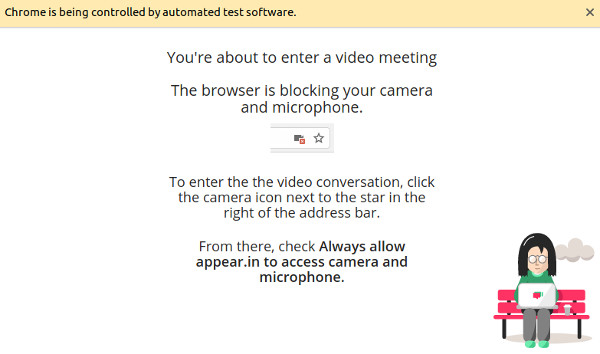
Let’s say we want to test the case that a user has denied permission. For appear.in this leads to a dialog that attempts to help them with the browser UX to change that.
The full test can be found here. As most selenium tests, it consists of a series of simple and straightforward steps:
- build a selenium webdriver instance that allows permissions and loads the extension
- go to the appear.in homepage
- set the List of fake devices in Chrome WebRTC testing flag to cause a NotAllowedError (i.e. the user has denied permission) as well as an appear.in specific localStorage property that says the visitor is returning — this ensures we go into the flow we want to test and not into the “getUserMedia primer” that is shown to first-time users.
- join an appear.in room by loading the URL directly.
- the next step would typically be asserting the presence of certain DOM elements guiding the user to change the denied permission. This is omitted here as those elements change rather frequently and replaced with a three second sleep which allows for a visual inspection. It should look like this:
- the List of fake devices in Chrome WebRTC testing flag is deleted
- this eventually leads to the user entering the room and video showing up. We do some magic here in order to avoid having to ask the user to refresh the page.
Watch a video of this test running below:
Incidentally, that dialog had a “enter anyway” button which, due to the lack of testing, was not visible for quite some time without anyone noticing because the visual regression tests could not access this stage. Now that is possible.
Restricting the list of available devices
The fake devices in both Chrome and Firefox return a stream with exactly those properties that you ask for and they always succeed (in Chrome there is a way to make them always fail too). In the real world you need to deal with users who don’t have a microphone or a camera attached to their machine. A call to getUserMedia would fail with a NotFoundError (note the recent change in Chrome 64 or simply use adapter.js and write spec-compliant code today).
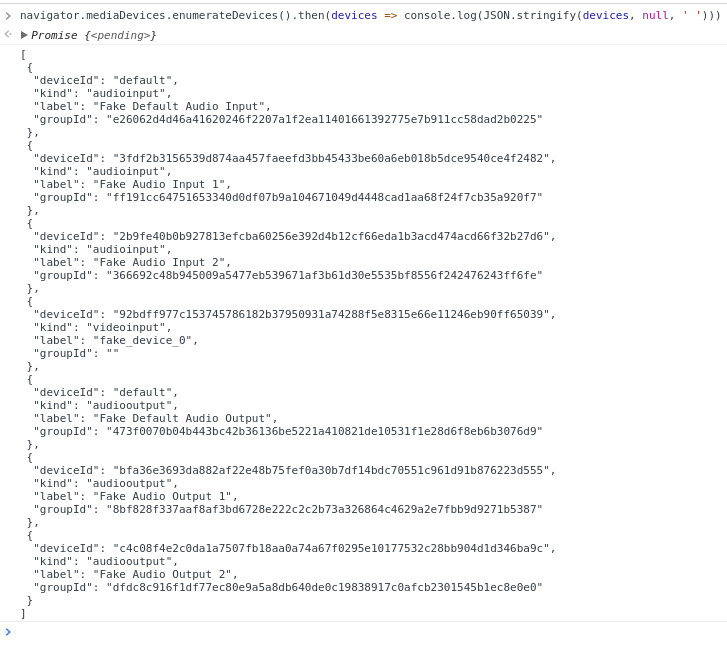
The common way to avoid this is to enumerate the list of devices to figure out what is available using enumerateDevices by pasting this into the javascript console:
navigator.mediaDevices.enumerateDevices().then(devices => {
 const hasMicrophone = devices.some(device => device.kind === “audioinput”);
 console.log(‘has microphone’, hasMicrophone);
});
When you run this together with the fake device flag you’ll notice that it provides two fake microphones and one fake camera device:
When the extension is loaded (which for manual testing can be done on chrome://extensions; see above for the selenium ways to do it) one can manipulate that list:
sessionStorage.__filterAudioDevices = true;
Paste the enumerateDevices into the console again and the audio devices no longer show up:

At appear.in we used this to replace a couple of audio-only and video-only tests that used feature flags in the application code with more realistic behaviour. The extension allows a much cleaner separation between the frontend logic and the test logic.
Summary
Using a tiny web extension we could easily extend the already powerful WebRTC testing capabilities of the browsers and cover more advanced test scenarios. Using this approach it would even be possible to simulate events like the user unplugging the microphone during the call.