• Skip to primary navigation
  • Skip to main content
  • Skip to footer
Cyara

Cyara

Cyara Customer Experience Assurance Platform

  • Login
  • Contact Us
  • Request a demo
  • Login
  • Contact us
  • Request a demo
  • Why Cyara
    • AI-Led CX Assurance Platform
    • AI vision for CX
    • Cyara partner network
    • Cyara Academy
  • Solutions
    • Transform
          • TRANSFORM – Drive CX Change

          • Functional, regression, & objective testing | Cyara Velocity
          • Performance testing | Cyara Cruncher
          • See all use cases >
          • Cyara platform - Transform - Drive CX change
    • Monitor
          • MONITOR – Assure CX Journeys

          • Telecom assurance | Cyara Voice Assure
          • CX & telecom monitoring | Cyara Pulse 360
          • Call ID line assurance | Cyara Number Trust
          • Agent environment assurance | Cyara ResolveAX
          • CX monitoring | Cyara Pulse
          • See all use cases >
          • Cyara platform - Monitor - Assure CX journeys
    • Optimize
          • OPTIMIZE — Leverage AI for CX

          • Conversational AI optimization | Cyara Botium
            • Functional & regression testing for AI agents
            • LLM-driven AI agent testing
            • Load testing for AI agents
            • NLP analytics for conversational AI in CX
          • Generative AI assurance | Cyara AI Trust
          • See all use cases >
          • Cyara platform - Optimize - Leverage AI for CX
    • Connect
          • CONNECT — Assure WebRTC CX

          • WebRTC optimization | Cyara testRTC
          • WebRTC monitoring | Cyara watchRTC
          • WebRTC quality assurance | Cyara qualityRTC
          • See all use cases >
          • Cyara platform - Connect - Assure WebRTC CX
  • Resources
    • CX Assurance blog
    • Customer success showcase
    • CX use cases
    • Events & upcoming webinars
    • On-demand webinars
    • Resource library
    • Customer community
  • About Us
        • About Cyara

        • About Cyara
        • Leadership
        • Careers
        • Legal statements, policies, & agreements
        • Services

        • Cyara Academy
        • Consulting services
        • Customer success services
        • Technical support
        • News

        • Press releases
        • Media coverage
        • Cyara awards
        • Partners

        • Partners

Blog / CX Assurance

November 1, 2022

Migrating from LUIS to CLU – Part 1: The Differences

Alison Houston

Alison Houston, Data model analyst

This article was originally published on QBox’s blog, prior to Cyara’s acquisition of QBox. Learn more about Cyara + QBox.


If you or your business regularly use Microsoft LUIS for building and maintaining your chatbots, you’re probably aware that the various Azure Cognitive Services—Text Analytics, QnA Maker and LUIS—will be consolidated into the new Azure Cognitive Services for Language. While any active LUIS endpoints will remain functional until the 1st of October 2025, you will not be able to create new LUIS resources just a few months from now, starting on the 1st of April 2023. For that reason, it is imperative that you familiarize yourself with what’s changing in the leap from LUIS to CLU.

Cyara helps businesses seamlessly test, train, and monitor chatbots throughout the entire development lifecycle.

Blue LUIS Migration van driving towards CLU city

The first part of this blog will highlight the major differences between LUIS and CLU as a chatbot-building interface—what functions are changing, and what new features have been added. In the second part, we’ll discuss the process of migrating your bot from LUIS into CLU, and test the performance of the new machine learning algorithms Microsoft has implemented under CLU’s hood.

New and Modified Features

While you can upload your LUIS chatbot’s exported json file to CLU, or indeed transfer entire projects over, as will be detailed in part 2 of this blog, there will be certain features that are modified or no longer supported in the new CLU version of your bot. Nevertheless, CLU also comes with more features, and is driven by a new NLP model.

When it comes to chatbot building, the following changes are the most important to keep in mind when planning your upgrade to CLU:

  • Punctuation and word form settings, Phrase Lists, and Patterns will no longer be supported in CLU, as the improved NLP model performance should render these configurations and extra recognition features unnecessary.
  • While entities like list, regex, and prebuilt entities remain largely the same, machine learned entities have been tweaked. In LUIS, entities could contain sub-entities, but in CLU each sub-entity will be treated as its own entity. For example, a suit size entity in LUIS, named size, could contain the sub-entities waist and shoulders. On conversion to CLU, these would be treated as distinct size.waist and size.shoulders entities.
  • In LUIS, new model versions are only created when the users decided to save or import one. In CLU, a new model version will be created and saved for future use during each round of training.
  • There are two model training options, the relatively short “Standard” mode and the longer “Advanced” mode. We will examine these in more detail in a later section of this blog.
  • CLU has the impressive ability to recognize multiple languages and train on a multi-lingual dataset.
  • A confidence threshold can now be declared in the settings, below which the model will instead default to the None intent as its top-ranked response.
  • During each round of training, the model’s performance will also be evaluated. This is achieved either by splitting all the training utterances into a train and test set, or by the user themselves labelling some of their utterances as part of the test set, to be held out of any training. 

The New Interface

Back in Microsoft LUIS, your intents and entities were defined in different parts of the sub-menu, and you could only view and edit the training data for one intent at a time. CLU takes a more flexible approach, with all intents and entities now listed under the “Schema Definitions” section of the menu—see Fig. 1. 
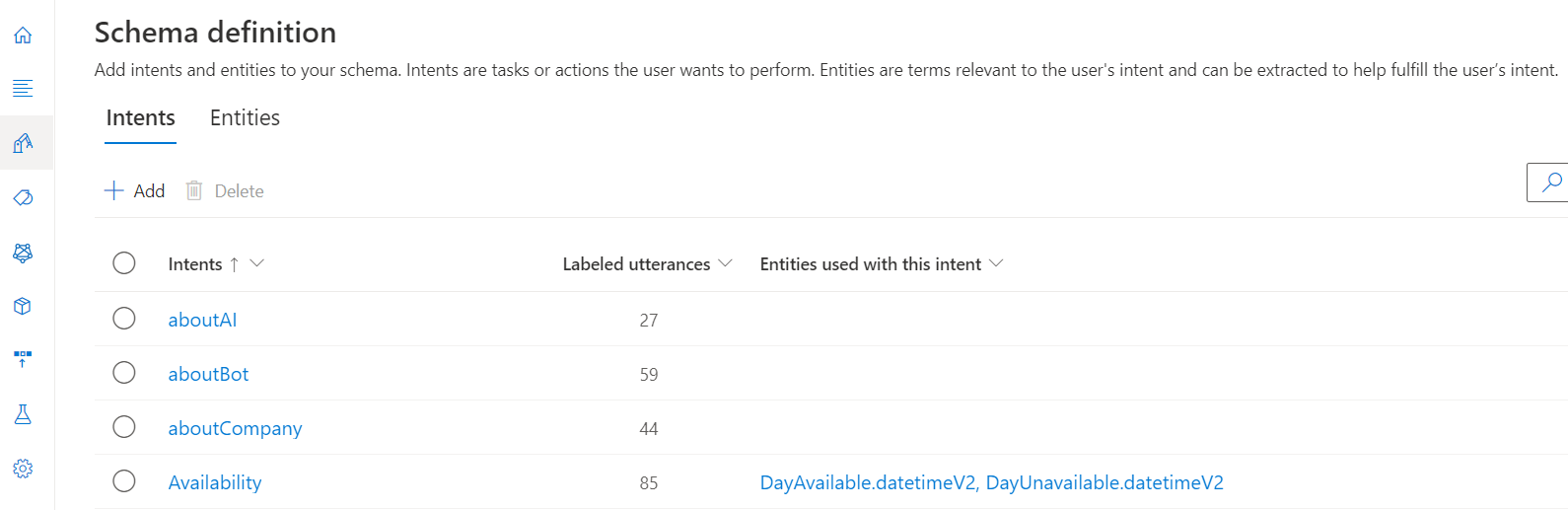
Figure 1: The “Schema definition” page in CLU, for creating new intents and entities. Clicking on one takes the user to a filtered version of the “Data labelling” page in Fig. 2.

Similarly, entering new training utterances and labelling entities is now all handled on a single “Data Labelling” page, shown in Fig. 2. If you wish to add your own test utterances, or move some training utterances into the test set or vice-versa, you can do this here as well. You can still filter the page by specific intents if desired.

Figure 2: The “Data labelling” page where the user can add new utterances, re-assign utterances to other intents, label entities, and split utterances into training and test sets.

Each time a new model is trained, you can view the resulting accuracy metric and confusion matrix for both your intents and your machine-learned entities on the “Model Performance” page, illustrated in Fig. 3.

Figure 3: When a training job is selected on the “Model performance” page, it takes you to this evaluation, which gives more details on when training was done, the kind of split used and resulting precision, recall, and F1 scores.

Advanced vs. Standard Training

As mentioned in an earlier section, when a user creates a new training job in CLU they will have the option to select either “Standard” or “Advanced” training, see Fig. 4.

Figure 4: The “Start a training job” page in CLU. Each job requires a new name, or a slot of a previous model to overwrite.

Standard training is fast, only taking a few minutes for each job (similar to LUIS) and is free to all users. Advanced, meanwhile, utilizes transformer models and can take considerably longer—in our testing we found a larger model on the scale of ~100 intents could take well over an hour to train—and incurs additional costs. It should, however, result in a much more accurate model. 

Unfortunately, the Standard option is currently only available in English, so if you wish to make use of CLU in other languages, or try out its multilingual capabilities, you will have to do so with Advanced training. 

For the purposes of saving both time and money, we would recommend mostly using Standard training when building your bot. Advanced training should only be reserved for final testing and deployment.

What About Our Solutions?

And now for some great news—since CLU is now widely available, we’ve already added the ability to carry out tests on CLU models!

Additional features such as Explain, DevOps and Experiment are not yet available, but if you wish to carry out automated or cross-validation testing on your new CLU-built chatbots, now you can—see example in Fig. 5.

Figure 5: Creating an automated test in QBox with a CLU .json file. Note either Standard or Advanced training options can be selected (Standard is recommended, but currently English-only)

If you’re creating CLU tests, please keep in mind what was discussed in the previous section—Advanced training can be very time consuming, so if you have an English model, we recommend carrying out any tests in Standard training mode.

Enjoyed reading this blog? Then don’t forget to check out part 2 where we look at migration and comparison. 

Read more about: Chatbot testing, Chatbots, Cognitive services for language, Conversational AI, Conversational AI Testing, Conversational language understanding (CLU), Microsoft LUIS, QBox

Ready for seamless CX assurance?

Learn how Cyara’s AI-led CX productivity, growth, and assurance engine can help you eradicate bad CX.

Speak to an expert
Office view with Cyara dashboard

Related Posts

conversational AI governance

November 13, 2025

Conversational AI Governance for CX: Ensuring Compliance, Bias Mitigation & Reliability

AI-powered CX channels handle millions of interactions every day. Deliver accurate and reliable CX with conversational AI governance.

Topics: Artificial intelligence (AI), Conversational AI, Conversational AI Testing, Customer experience (CX)

AI CX dealbreakers

November 12, 2025

New Survey Data: The AI Dealbreakers Making Consumers Ghost

As customer expectations and Agentic AI technology evolves, you must avoid dealbreakers and deliver quality interactions for best results.

Topics: Agentic AI, Artificial intelligence (AI), Conversational AI, Conversational AI Testing, Customer experience (CX)

conversational AI testing

August 28, 2025

Automated Testing for Conversational AI: A Game-Changer in Customer Support

The rise of AI-powered CX offer many key benefits... and risks. Learn how to ensure CX quality with a conversational AI testing solution.

Topics: AI chatbot testing, Artificial intelligence (AI), Automated testing, Chatbots, Conversational AI, Conversational AI Testing, Customer experience (CX)

Footer

  • AI-Led CX Assurance Platform
    • Cyara AI Trust
    • Cyara Botium
      • Functional & regression testing for AI agents
      • LLM-driven AI agent testing
      • Load testing for AI agents
      • NLP analytics for conversational AI in CX
    • Cyara CentraCX
    • Cyara Cloud Migration Assurance
    • Cyara Cruncher
    • Cyara Number Trust
    • Cyara probeRTC
    • Cyara Pulse 360
    • Cyara Pulse
    • Cyara qualityRTC
    • Cyara ResolveAX
    • Cyara testingRTC
    • Cyara testRTC
    • Cyara upRTC
    • Cyara Velocity
    • Cyara Voice Assure
    • Cyara watchRTC
  • Use cases
    • Agent desktop testing
    • Cloud contact center monitoring
    • Contact center number test types
    • Contact center testing
    • Continuous testing
    • Conversational AI testing
    • CX monitoring
    • DevOps for CX
    • Email & SMS testing
    • Functional testing
    • Incident management
    • IVR discovery
    • IVR testing
    • Load & performance testing
    • Omnichannel testing
    • Outbound call testing
    • Regression testing
    • Voice biometrics testing
    • Voice of the customer
    • Voice quality testing
    • Web interaction testing
  • Resources
    • CX Assurance blog
    • Customer success showcase
    • Events & upcoming webinars
    • Resource library
    • On-demand webinars
    • Cyara portal & support site access
    • Customer community
  • About us
    • About Cyara
      • About us
      • Leadership
      • Careers
      • Cyara awards
      • Legal statements, policies, & agreements
    • Services
      • Cyara Academy
      • Consulting services
      • Customer success services
      • Technical support
    • News
      • Press releases
      • Media coverage
    • Partners
      • Partners
      • Integration & technology partners
      • Platform Integrations
Cyara
  • LinkedIn
  • Twitter
  • YouTube

Copyright © 2006–2026 Cyara® Inc. The Cyara logo, names and marks associated with Cyara’s products and services are trademarks of Cyara. All rights reserved. Privacy Statement