
This article was originally published on testRTC’s blog, prior to Cyara’s acquisition of Spearline and testRTC. Learn more about Cyara + Spearline.
As call centers are shifting from office work to work from home with the help of cloud and WebRTC, network quality and testing are becoming more important than ever. qualityRTC is here to help.
“testRTC’s Network Testing service reduces the turnaround time for us in understanding and addressing potential network issues with clients”
João Gaspar, Global Director, Customer Service at Talkdesk
How did we get here?
Call centers were in a slow migration, from on-premise deployments transitioning towards the cloud. It was the SMBs, a few larger call centers and that’s about it. We’ve started seeing upmarket movement of cloud call center providers towards larger contact centers, talking about 1,000s of agents and more per call center.
This migration came to be because of several things occurring at once:
- A general shift of everything to the cloud
- The success of SaaS startups of all kinds and the rise of unicorns (a few of them in the communication and call center space)
- WebRTC as a browser technology
- The need for more business agility and flexibility, along with the movement of remote work
- Cost
- Transition time to a new software stack
In March 2020 what we’ve seen is a rapid transition to remote work for all imaginable jobs. All of them. Everywhere. In most countries.

Source: The Economist
The reds and cyans on the map above from The Economist are quarantined countries. And that’s from over two weeks ago. This is worse today.
Here’s the funny thing:
- We’re not all stuck at home
- Switched to online deliveries of everything. From computing hardware, to gym gear, to groceries and food deliveries
- We need call centers more than ever before
- But call centers are physical locations, where employees can no longer reside. At least not if the service is deemed non-essential
What are we to do?
Rapidly shift call centers to work from home.
Call center deployments today
And there are two main architectures to get that done, and which one a call center will pick depends on where they started – on premise or in the cloud:
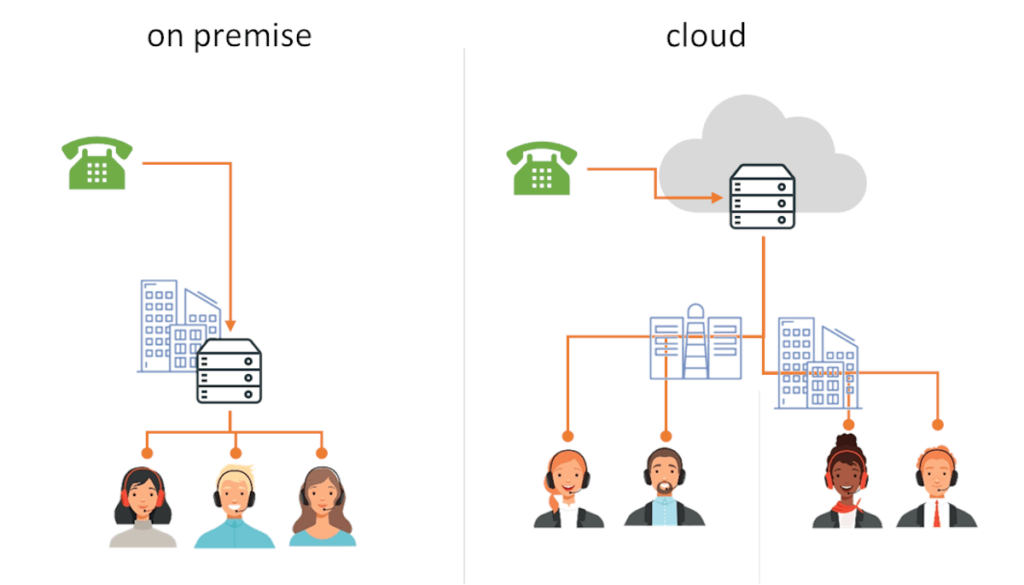
Cloud based call centers are more suitable for the WFH era, but they have their challenges as well. And in both cases, there’s work to be done.
Shifting to cloud call center WFH
Here’s how a shift to WFH looks like, and how we get there, depending on where we started (cloud or on premise):
Cloud based call centers would simply switch towards having their calls diverted to the agents’ homes. On premise call centers can go two ways:
- Migrate to the cloud, in record time, with half the customizations they have in their on premise deployment. But you can’t get picky these days
- Connect the on premise call center via an SBC (Session Border Controller) to the home office
WFH call center agents biggest challenge
Once you deal with the architectural technical snags, you are left with one big challenge: getting 100s or 1,000s of agents to work from home instead of in the office.
And the challenge is that this is an environment you can’t control.
A month ago? You were in charge of a single network – the office one. You had to make sure it was connected properly to the cloud or the SIP trunk that connected you to the carrier to get your calls going. Maybe you had several offices, each one housing lots of agents.
Today? You need to handle connectivity and media quality issues of more than a single office – more like hundreds or thousands of agents. Each with his own network and his own issues:
- Bad firewall configurations
- Misuse of VPN software (trying to watch the latest TV shows abroad)
- Poor service provider internet access
- Wrong location in the house, causing poor wifi reception
- and the list of surprising issues goes on…
Analysing and understanding the network conditions of each home network of each agent becomes a first priority in scaling up your call center back to capacity.

If each agent takes 30 minutes to deal with to get to the root cause of the issues blocking him from running properly, then getting a contact center of 100 agents will take 50 work hours for your IT. For 1,000 agents – 500 hours. This is definitely NOT scalable.
qualityRTC for WFH agents network testing
We’ve designed and built qualityRTC to assist cloud call center vendors handle onboarding and troubleshooting issues of the call center clients they have.
What we found out this past month is that qualityRTC shines in call center WFH initiatives – both for the vendors but also directly for the call centers themselves. We’ve seen an increase of x100 use of our demo, which led us to place it behind a password, in an effort to protect the service capacity for our clients.
Here’s how results look on our service:

The above is a screenshot taken on my home network.
qualityRTC offers several huge benefits:
- It conducts multiple network tests to give you a 360 view of your agent’s home network. This is far superior to the default call test solutions available in some of the call center services
- qualityRTC is simple to use for the home agent. Collecting the statistics takes only a few minutes and require a single click
- There is no installation required, and the integration to your backend is simple (it is even simpler if you are a Twilio or TokBox customer already). Oh – and we can customize it for your needs and brand
- There’s a workflow there, so that your IT/support get the results immediately as they take place. You don’t need to ask the agent to send you anything or to validate he did what you wanted
Here’s a quick walk-through of our service:
Want to take us for a spin? Contact us for a demo.
qualityRTC network testing FAQ
No. You don’t need to install anything.
Your agents can run the test directly from the browser.
We don’t need you to install anything in your backend for this to work. We will integrate with it from our end.
We conduct multiple tests. For WFH, the relevant ones are: a call test through your infrastructure, firewall connectivity tests, location test, bandwidth speed test and ping test.
By having all these tests conducted and collected from a single tool, to your infrastructure, and later visualized for both the agent and your IT/support, we make it a lot simpler for you to understand the situation and act based on solid data.
A call test is just that. A call test.
It tells you some things but won’t give you a good view if things go wrong (like not being able to connect a call at all). What qualityRTC does is conduct as many tests as possible to get an understanding of the agent’s home network so that you can get a better understanding of the issues and solve them.
Yes. A lot of the network problems are going to be similar in nature. Some of the tests we conduct aren’t even done using WebRTC.
Our service is based on WebRTC, but that doesn’t mean you can’t use it to validate a call center that offers its remote agents service via SIP.
If you are using Twilio or TokBox we can set you up with an account in a day. A branded site in 2-3 more days.
If you are using something else, we can start off with something that will work well and fine tune to your exact needs within 1-2 weeks.
Reach us out for pricing. It depends on your size, infrastructure and need.
From a point of view of price structure, there’s an initial setup and customization fee and a monthly subscription fee – you’ll be able to stop at any point in time.
qualityRTC will work for you just as well. The service connects to your infrastructure wherever it is, conducting bandwidth speed tests as close as possible to your data centers. This will give you the most accurate picture, without regards to where on the globe or in what exact location your agents are.
No. We also support video calls and video services.
And once we’re back to normalcy, there is also a specific throughput test that can give some indication as to the capacity of your call center’s network (when NOT working from home).
Yes it is.
Our main focus for the product is to check network readiness for communication services. It just so happens that our tool is a life saver today for many call centers that are shifting to work from home mode due to the pandemic and the quarantines around the globe.
Call Center WFH Solutions
If you need help in shifting your call center towards work from home agents, contact us – we can help. Both in stress testing your SBC capacity as well as in analyzing your agent’s home network characteristics.