
This article was originally published on testRTC’s blog, prior to Cyara’s acquisition of Spearline and testRTC. Learn more about Cyara + Spearline.
WebRTC video diagnostics should be tackled with a holistic approach that offers an end-to-end solution for your users and your support team.
Let’s go through this rabbit hole of network testing – and what testRTC has to offer.
Dev Tools: Build vs Buy

What I find fascinating about developer tools is the discussions you get into. Developers almost always underestimate the effort needed to do things and overestimate their skills. This is why 12 years later, the post by Jeff Atwood about copying Stackoverflow still resonates with me (read it – it is golden).
In our line of business at testRTC we get it a lot. Sentences like “we have something like this, but not as nice” or “we are planning on developing it ourselves”. Sometimes they make sense. Other times… not so much.
Over time though, the gap between an in-house tool to a 3rd party commercial alternative tends to grow. Why? Because in-house tools are bound to be neglected while 3rd party ones get care and attention on a regular basis (otherwise, who would adopt them?)
You see this also with WebRTC video API vendors (CPaaS): Most of them up until recently provided media server infrastructure with client side SDKs to connect to them. Anything else was a bonus. In the last year or two though, many of these API vendors are building more of the application layer and giving it to their customers in various ways: from ready-made iframe widgets, through UI libraries to group calling SDKs and fully built reference applications.
Twilio took it a step further with their RTC Diagnostics SDK last year and then this month the Video Diagnostics App. Both of these packages are actually reference code that Twilio offers for developers so they can write their own network testing / diagnostics / precall / preflight implementation a bit more easily.
This begs the question – what makes diagnostics such an issue that it needs an SDK and an app as references for developers to us?
Our WebRTC diagnostics and troubleshooting interaction pyramid
If we map out our users and their WebRTC configuration/network issues, we can place that in a kind of a pyramid diagram, where the basis of the pyramid are users that have no issues, and the more we go up the pyramid, the more care and attention the users need.
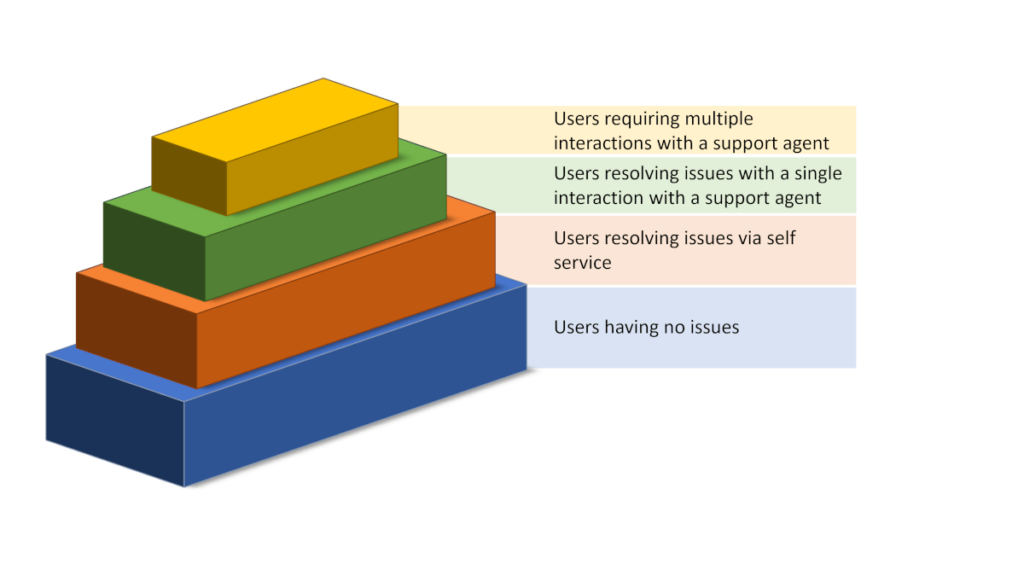
Our purpose in life would be to “push” as many users as we can down the pyramid so that they would be able to solve their connectivity issues faster. That would reduce the energy and strain from the support organization and will also result in happier customers.
Pushing users down the pyramid requires better tooling used by both our end users AND our support team.
The components of WebRTC diagnostics
When you are thinking of assisting end users with their connectivity or quality issues over WebRTC, you’re mainly thinking about peripheral devices and networks.
There’s this dance that is going to happen. A back and forth play where you’re going to ask users to do something, they will do it, you’ll look at what they did – rinse and repeat. Until the problem is solved or the user goes away frustrated.
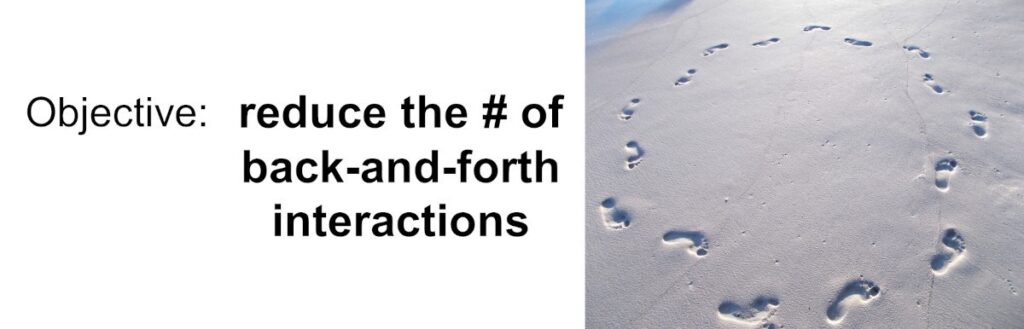
What we want to do is to reduce the amount of back and forth interactions and if possible make it go away entirely.
Here are the things the user will be interested in knowing:
- Are my peripherals (microphone and camera) set up correctly?
- Can I connect to the service?
- Am I getting a good quality connection?
But then there are the things our support would like to understand as well:
- Can the microphone or camera the user has cause issues?
- What machine is he running on exactly, and with what middleware?
- Where is he coming from?
- How is the user’s network behaving in general?
- Does he have a stable connection with a “clean” network?
- Did anyone configure their firewall in any restrictive way?
As you can see, there’s a slight difference in the requirements of the end users while they tries to solve the problem versus what support would need to help them out.
Oh, and then there are the differences between just voice services and video services, where WebRTC video diagnostics are a bit trickier in nature.
Let’s review what components we’re going to need here.
1. A/V Setup/configuration

You want to let the users understand if their microphone and camera work. And for that, you need to add some settings screen – one that will encompass the use of these devices and enable users to pick and choose out of the selection of devices they have connected. It is not unheard of to have users with multiple microphones and/or cameras (at any given point in time, my machine here shows 3 cameras (don’t ask why) and 4 different microphone alternatives.
This specific configuration is also tricky – you need to be able to handle it in two or three different places within your application: at the very least, on the first time someone uses your service and then again inside a session, if users want to switch between devices mid-session.
For the most part, I’d suggest you take care of this setup on your own – you know best how your UI/UX should be and what experience you’re after for your users.
2. Precall/preflight connectivity check(s)
Some like it, others don’t. The idea here is to have the user go through an actual short session in front of the media server, to see if they can get connected and understand the quality of the connection. This obviously takes time (30+ seconds to get a meaningful reading usually).
It is quite useful in the sense of preparation:
- When the session is important enough to have people join a wee bit earlier;
- Or when the user can be forced to go through the hoops of waiting for this
Bear in mind that such a connectivity check should better happen in front of the media server or at the very least the data center that the user will get connected to in his actual session.
Also note that for WebRTC video diagnostics, the tests here are a bit different and more rigorous, especially since we need to test for much higher bitrates (and usually for slightly longer periods of time).
3. Automated data collection

We’re getting to the part that is important to the support team more than it is to the end user.
Here what we’re after is to collect anything and everything that might be remotely useful to our needs. Things like:
- The type of network the user is on
- How is he connected to the service?
- What are the names of the devices they have?
- Where is the user located geographically?
- Do we know what specific microphone and camera they are using?
- What operating system and browsers do they use?
Lots and lots of questions that can come in handy to figure out certain types of breakages and behaviors.
We can ask the user, but:
- They might not know, or have hard time finding that information (and we don’t want to burden them at this point any further)
- They might be lying to us, usually because they aren’t certain (and sometimes because they just lie)
Which means automating that collection of information somehow, which means being able to glean that information with as little work and effort as possible on the user’s side.
4. 360 network testing

Let’s assume the user can’t connect to your service or even that they experience poor quality due to some bandwidth limitations or high packet loss. Is that because of your infrastructure or their home/office network?
Hard to say. Especially if all you have to go with is the metrics on your server or the webrtc-internals dump file from the user’s device. Why? Because the story you will find there will be about what happens in front of your service alone.
What you really need is a 360 view of your user’s network. And for that, you need a more rigorous approach. Something that would intentionally test for network connectivity on various protocols, try to understand the bandwidth available, connect elsewhere for “comparison” – the works.
The hard thing here is that to properly conduct such tests and collect the data you will need to install and configure your own specialized servers for some of the tasks. These aren’t going to be the ones your WebRTC application infrastructure uses for the day to day operations – just ones that are used for troubleshooting such user issues.
You can do without this, but then, your results and the information you will have won’t be as complete, which means figuring out the trickiest user issues will be… trickier… and will take more time… and will cause more frustrations for said user.
5. Workflow

Then there’s the workflow.
A user comes in, complains.
What now?
Do you wing it each time? Whenever a user complains – do the people in support know what to do? Do they have the process well documented? Do you guide or hint to users how they can solve the issues themselves?
Thinking of that workflow, assuming you have templated emails and responses readily available, how do you deal with the user’s responses? How do you make sense of the data they send back? What if the user goes off your script?
And while we’re at it, are you collecting the complaints and analysis and storing it for later analysis? Something you can use to understand what types of typical issues and complaints exist and how you can improve your infrastructure and your workflow?
This part is often neglected.
Our qualityRTC solution for WebRTC diagnostics
We’ve got a solution for the WebRTC audio or WebRTC video diagnostics challenge. One that takes care of the network testing in ways that build your self service and hands on support for users – in a way that fits virtually any workflow.
If you want to really up your game in WebRTC diagnostics – for either voice or video scenarios – with Twilio, some other CPaaS vendor or with your own infrastructure – let us know. We can help using our qualityRTC network testing solution.